Converti JPG in WebP Online
Trasforma le tue immagini JPG nel moderno formato WebP all'istante e gratuitamente. Ottieni file molto più leggeri con la stessa qualità visiva: perfetto per siti web più veloci e una SEO migliore.
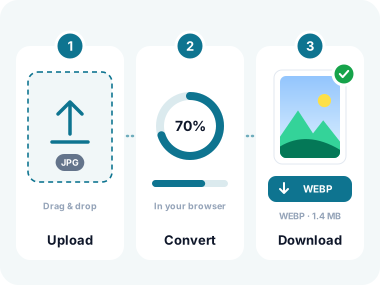
Come convertire immagini in WebP in 3 semplici passaggi
- Carica le tue immagini
Clicca su "Scegli i file" o trascina le immagini nell'area di caricamento. Supporta JPG, PNG, SVG, HEIC, TIFF, BMP, GIF, AVIF, WebP, ICO e i formati immagine più comuni. I file PSD non vengono decodificati in questa pagina. Il limite di dimensione è dato dalla memoria del browser. - Scegli la qualità e converti
Seleziona il livello di qualità che preferisci: Alta (qualità migliore), Media (bilanciata) o Bassa (file più leggero). Clicca su "Converti in WebP" per elaborare tutte le immagini in una volta. Gli SVG vengono rasterizzati alle loro dimensioni native per risultati perfetti al pixel. - Scarica i tuoi file WebP
Scarica i singoli file WebP convertiti oppure tutti insieme in un archivio ZIP. Le tue immagini originali non vengono mai caricate: tutta la conversione avviene nel browser, per la massima privacy e velocità.
Funzionalità principali del nostro convertitore di immagini in WebP

Supporto universale dei formati
Converti JPG, PNG, SVG, HEIC, TIFF, BMP, GIF, AVIF, ICO e altri in WebP. Carica qualsiasi formato immagine: il nostro strumento li gestisce tutti senza problemi in un unico batch.
Conversione velocissima
Tutta l'elaborazione avviene interamente nel browser grazie alla tecnologia Canvas avanzata. Nessuna attesa per il caricamento su server: le conversioni sono istantanee, anche per grandi batch di immagini.

Controllo della qualità regolabile
Scegli tra le impostazioni di qualità Alta, Media o Bassa per bilanciare fedeltà visiva e dimensione del file. Un WebP a qualità media riduce in genere le dimensioni del 60-80% rispetto al JPG originale.

Rasterizzazione SVG
Converti file vettoriali SVG in immagini WebP perfette al pixel. Il nostro strumento legge le dimensioni e il viewBox dell'SVG per garantire una rasterizzazione nitida alla risoluzione corretta, senza distorsioni.

Privacy 100% lato client
Le tue immagini non lasciano mai il tuo dispositivo. Zero caricamenti su server, zero raccolta di dati. Tutta la conversione avviene localmente nel browser e funziona anche offline una volta caricata la pagina.
Elaborazione in batch e download ZIP
Carica decine di immagini, convertile tutte con un clic e scarica i risultati in un archivio ZIP. Perfetto per gli sviluppatori web che ottimizzano intere librerie di immagini.

Nessuna filigrana, completamente gratis
Nessun costo nascosto, nessuna filigrana, nessuna registrazione, nessun limite. Converti tutte le immagini che vuoi, quando vuoi: 100% gratis per sempre.
Ritaglio e rotazione integrati
Modifica le immagini prima di convertirle con gli strumenti integrati di ritaglio, rotazione e capovolgimento. Regola la composizione, correggi l'orientamento e ottieni il risultato perfetto senza software esterni.
Perché convertire in WebP?
WebP offre una compressione superiore per il web moderno: scopri come aiuta in ogni caso d'uso
Siti più veloci e SEO migliore
Le immagini WebP sono più piccole del 25-34% rispetto ai JPG e del 26% rispetto ai PNG. Pagine più veloci migliorano direttamente il posizionamento su Google, i Core Web Vitals e l'esperienza utente.
Pagine prodotto e-commerce
Riduci le dimensioni delle immagini senza perdita di qualità visibile. Immagini prodotto più veloci significano frequenze di rimbalzo più basse, più conversioni e costi di banda ridotti su larga scala.
Blog e content marketing
Mantieni gli articoli del blog velocissimi anche con molte immagini. WebP offre foto nitide con una frazione del peso, così i lettori non devono aspettare i tuoi contenuti.
Risorse per app mobile
Immagini più piccole significano pacchetti app più leggeri e download più rapidi. WebP è supportato nativamente su Android e iOS, il che lo rende il formato ideale per le app mobile.
Email marketing
Molti client di posta ora supportano WebP. Usa immagini più leggere nelle tue campagne per migliorare la deliverability e ridurre i tempi di caricamento nelle caselle di posta di tutto il mondo.
Conversione da SVG a raster
Ti serve una versione raster perfetta al pixel dei tuoi loghi o icone vettoriali? Converti gli SVG in WebP alle loro dimensioni native: ideale per le piattaforme che non supportano SVG.
Domande frequenti (FAQ)
Cos'è WebP e perché dovrei usarlo?
WebP è un formato immagine moderno sviluppato da Google che offre una compressione lossy e lossless superiore. Le immagini WebP sono più piccole del 25-34% rispetto a immagini JPEG equivalenti e del 26% rispetto ai PNG, mantenendo la stessa qualità visiva. È supportato da tutti i browser moderni, tra cui Chrome, Firefox, Safari ed Edge.
Quali formati immagine posso convertire in WebP?
Il nostro convertitore supporta tutti i principali formati immagine: JPG, JPEG, PNG, SVG, GIF, BMP, TIFF, WebP, HEIC, HEIF, AVIF, ICO e altri. Puoi persino combinare formati diversi nello stesso batch: carica insieme un JPG, un SVG e un PNG e convertili tutti in WebP in una volta.
Posso convertire file SVG in WebP?
Sì! Il nostro strumento include una tecnologia speciale di rasterizzazione SVG. Quando carichi un SVG, leggiamo le sue dimensioni native (dagli attributi width/height o dal viewBox) e lo renderizziamo alla massima risoluzione prima di convertirlo in WebP. Questo garantisce risultati perfetti al pixel senza distorsioni. Se non sono specificate dimensioni, usiamo per impostazione predefinita 1024×1024 pixel.
La conversione influisce sulla qualità dell'immagine?
La compressione di WebP è straordinariamente efficiente. Con qualità "Alta", il risultato è visivamente identico all'originale. Con "Media" (la nostra impostazione predefinita) ottieni un ottimo equilibrio: in genere file più piccoli del 60-80% senza perdita di qualità percepibile. Anche con qualità "Bassa", le immagini restano nitide e utilizzabili per la maggior parte delle applicazioni web.
Le mie immagini vengono caricate su un server?
No. Tutta la conversione avviene al 100% nel browser tramite la Canvas API di HTML5. Le tue immagini non lasciano mai il tuo dispositivo: non vengono mai caricate, archiviate o trasmesse a nessun server. Questo rende il nostro convertitore uno degli strumenti per immagini più rispettosi della privacy disponibili online.
Quante immagini posso convertire contemporaneamente?
Non c'è un limite fisso. Puoi convertire decine di immagini in un unico batch. Poiché l'elaborazione avviene in locale, le prestazioni dipendono dal tuo dispositivo: la maggior parte dei computer moderni gestisce senza problemi oltre 50 immagini. Puoi scaricare tutti i file convertiti in un unico archivio ZIP.
WebP è supportato da tutti i browser?
Sì: WebP è supportato da tutti i browser moderni, tra cui Chrome, Firefox, Safari (14.0+), Edge e Opera, e copre oltre il 97% degli utenti nel mondo. Per la piccola percentuale di utenti con browser datati, puoi usare l'elemento HTML <picture> per fornire un JPG o PNG di riserva insieme alle tue immagini WebP.
Devo installare qualcosa?
Non serve alcuna installazione. Il nostro convertitore WebP funziona interamente nel browser. Apri la pagina, carica le immagini e converti. Nessun plugin, nessun download, nessuna registrazione. Funziona su Windows, Mac, Linux, Android, iOS: qualsiasi dispositivo con un browser moderno.
Cosa dicono i nostri utenti
Scelto da sviluppatori web, designer e marketer in tutto il mondo
"Gestisco un grande sito e-commerce con migliaia di immagini prodotto. Passare da JPG a WebP ha ridotto del 40% il tempo di caricamento delle pagine. Questo convertitore ha reso la migrazione semplicissima: ho convertito in batch oltre 200 immagini in pochi minuti."
"La funzione da SVG a WebP cambia le regole del gioco. Disegno icone in Illustrator, le esporto in SVG e poi le converto in WebP per le piattaforme che non supportano i vettoriali. La qualità di rasterizzazione è impeccabile."
"Adoro il fatto che nulla venga caricato su un server. Lavorando spesso con le foto dei clienti, la privacy per me non è negoziabile. Questo strumento converte tutto in locale: ho controllato la scheda Rete per verificarlo. Consigliatissimo."
Conversione privata e sicura
Le tue immagini restano sul tuo dispositivo. Il nostro convertitore WebP usa un'architettura a zero caricamenti: ogni conversione avviene interamente nella sandbox del tuo browser.
A differenza della maggior parte dei convertitori online, che caricano i file su server remoti, usiamo la Canvas API di HTML5 per elaborare le immagini in locale. Le tue foto non lasciano mai il dispositivo, nemmeno temporaneamente.
Sicurezza della sandbox del browser
Le conversioni avvengono all'interno dell'ambiente sandbox sicuro del browser. Nessun accesso al file system, nessuna connessione esterna.
Conforme a GDPR e CCPA
Poiché non accediamo mai ai tuoi dati, rispettiamo per natura tutte le principali normative sulla privacy nel mondo.
Tecnologia WebP di Google
Usiamo la codifica WebP nativa del browser, la stessa tecnologia sviluppata da Google. Affidabile, collaudata e ottimizzata per le prestazioni.
Strumenti per immagini correlati
Altri strumenti per convertire, ottimizzare e gestire le tue immagini.
Converti da JPG
Converti in JPG
Utilità per immagini

Converti JPG in WebP Online - italiano
Disponibile in altre lingue
Converti le tue immagini in WebP: gratis e all'istante
Carica JPG, PNG, SVG o qualsiasi formato immagine e ottieni file WebP ottimizzati in pochi secondi: nessuna registrazione, nessun caricamento, nessun limite.
- ✓ 100% free
- ✓ No signup
- ✓ Files stay private