Image Compressor Online
Reduce image file sizes instantly without compromising quality. Compress JPG, PNG, WebP, HEIC, AVIF, SVG, GIF & TIFF files with custom quality, resizing, and multi-format download. 100% free.
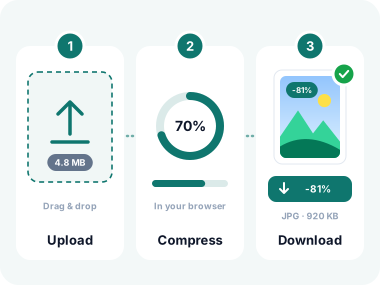
How to Compress Images in 3 Simple Steps
- Upload Your Images
Click the upload button or drag and drop your image files. Supports JPG, PNG, WebP, HEIC, AVIF, SVG, GIF, TIFF, BMP and more. Upload up to 50 MB per image with no account required. - Adjust Quality & Resize
Set your desired compression quality (10–100%) per image or globally. Optionally enter a target width and height to resize images while maintaining the original aspect ratio. Pick your output format: JPG, PNG, or WebP. - Download Compressed Images
Hit "Compress All" to process your images instantly in your browser. Download individual files or all at once. See exactly how much space you saved per file and overall.
Why Choose Our Image Compressor?

All Image Formats Supported
JPG, PNG, and WebP are first-class. HEIC, AVIF, SVG, and TIFF depend on the browser and may fail or be re-encoded.

Smart Resize & Compress
Enter a custom width and height, toggle aspect ratio lock, and compress to get the exact dimensions you need with smaller file sizes.

Client-Side Processing
Compression happens in your browser.

Per-Image Quality Control
Set a global quality level or fine-tune each image individually with a dedicated slider. Get exactly the trade-off you want between size and sharpness.

Batch Processing
Compress dozens of images in one click. This tool handles your entire batch simultaneously so you can download and move on in seconds.

Multi-Format Output
Export compressed images as JPG for photos, PNG for graphics with transparency, or WebP for the best web performance. The choice is yours.

Real-Time Size Savings
See the original vs compressed file size, percentage saved per image, and total bytes saved across your entire batch, right on screen.

No Watermarks. Completely Free
No signup, no watermarks, no hidden limits. Compress as many images as you need with professional-quality results every time.
Who Uses This Image Compressor?
From photographers and web developers to marketers and e-commerce sellers, anyone who works with images benefits from fast, high-quality compression.
Web Developers
Reduce image payload to pass Core Web Vitals, cut page load times, and improve Google rankings. Compress to WebP for ultimate web performance.
E-Commerce Sellers
Keep product photos crisp while meeting strict marketplace upload limits on Amazon, eBay, Etsy, and Shopify.
Photographers
Compress RAW exports and HEIC iPhone photos for delivery to clients, portfolio websites, or social sharing without visible quality loss.
Social Media Managers
Meet X, Facebook, LinkedIn, and Instagram upload size limits while keeping your images vibrant and sharp.
Email Marketers
Reduce banner and header image sizes so campaigns load fast in every email client and on every device.
Bloggers & Content Creators
Optimise images for WordPress, Ghost, Medium, and other CMS platforms to improve your SEO score and reader experience.
Office & Business Teams
Shrink screenshots, logos, and presentation assets before attaching them to emails or uploading to shared drives.
Students & Educators
Compress images for Google Slides, PowerPoint decks, academic reports, and online form submissions.
Mobile App Developers
Generate optimised assets at the right resolution and file size for iOS and Android app bundles, cutting app download sizes.
Frequently Asked Questions
What image formats can I compress?
JPG, PNG, and WebP work reliably. HEIC, AVIF, SVG, TIFF, GIF, and BMP depend on the browser. SVG is rasterized if it loads at all.
Does compressing an image reduce its quality?
Compression always involves a trade-off. At 80–90% quality, most people cannot see any visible difference in photos. The quality slider lets you find the perfect balance between file size and sharpness for your use case.
Is my image uploaded to a server?
Compression happens in your browser. Your files are deleted when you close the tab.
Can I resize and compress at the same time?
Yes! Enter a target width and/or height in the resize fields, enable aspect ratio lock to prevent distortion, and compress. Both operations are applied simultaneously in one step.
What output formats can I download?
You can download your compressed images as JPG (best for photos), PNG (best for graphics with transparency), or WebP (best for web performance and smaller sizes).
How many images can I compress at once?
There is no hard limit. You can compress dozens of images in a single batch. Each file can be up to 50 MB. The entire batch is processed simultaneously in your browser.
Why should I compress images for my website?
Oversized images are one of the biggest causes of slow websites. Compressed images load faster, reducing bounce rates, improving Google Core Web Vitals, and boosting SEO rankings, all without affecting the visual experience.
What Our Users Say
"I use this every day for my Shopify store. Compressing product images in bulk used to be a chore. Now it takes 10 seconds. The quality is excellent and the WebP output is fantastic for page speed."
"Finally a compressor that handles HEIC files from my iPhone without any hassle. I shoot, drop the files in, and download perfectly optimised images for my blog. Game changer."
"The per-image quality sliders are brilliant. I can keep hero images at 90% quality and thumbnails at 60% in the same batch. Our Core Web Vitals score improved significantly after using this."
Privacy-First Image Compression
We built this compressor with privacy as a top priority. Every image is processed locally inside your browser. Nothing is ever transmitted to our servers.
Unlike cloud-based compressors that store your images for analytics or model training, our tool performs 100% client-side compression. Your files never leave your device.
Zero Server Uploads
Your images are processed using JavaScript and the Canvas API. No data is ever sent to our servers, so compression is instant and private.
No Retention, No Storage
We do not store, log, or analyse any of your images. The moment you close the tab, your data is gone.
GDPR & CCPA Compliant
Fully compliant with international data privacy laws. Your images and personal data are protected by design.
Related Image Tools
Explore more tools based on how you work with images.
Convert From JPG
Convert to JPG
Other Tools



Image Compressor Online
Reduce image file sizes instantly without compromising quality. Compress JPG, PNG, WebP, HEIC, AVIF, SVG, GIF & TIFF files with custom quality, resizing, and multi-format download. 100% free.
- ✓ 100% free
- ✓ No signup
- ✓ Files stay private