Merge JPG Online
Combine multiple images into one file in your browser. Merge photos horizontally or vertically. No registration and no watermarks.
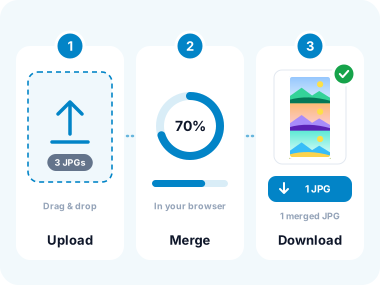
How to Merge JPG Images in 3 Simple Steps
- Upload Your JPG Images
Click the "Choose Files" button or drag and drop multiple JPG files into the upload area. Supports JPG, JPEG, PNG, WebP, HEIC and other popular image formats. Maximum file size: 50 MB per image. - Customize Your Result (Optional)
Use the drag-and-drop interface to rearrange your images into the perfect sequence. This visual reordering makes it easy to get exactly the layout you want before merging. Choose between Horizontal (side-by-side) or Vertical (stacked) merging style based on how you want your images combined. - Download Merged File Instantly
Download the high-quality merged file directly to your device with no watermarks or quality loss.
Key Features of Our JPG Merger Tool

Two Powerful Merge Styles
Choose between Horizontal merging for side-by-side comparisons and panoramas, or Vertical merging for stacked sequences and timelines.

Drag-and-Drop Reordering
Simply drag images to rearrange their position before merging. This intuitive visual interface makes it easy to get the exact sequence you want.

Maintain Original Quality
Images are merged in your browser.

Universal Format Support
Merge JPG, JPEG, PNG, WebP, HEIC, TIFF, BMP, and other popular image formats seamlessly. You can even mix different formats in the same merge operation.

Batch Processing Power
Merge 20+ images in a single operation with our batch processing feature. Our tool handles large batches smoothly without quality loss or processing delays.

Complete Privacy Protection
Merging happens in your browser. Your files are deleted when you close the tab.

Lightning-Fast Processing
Our technology merges images instantly even with large files, So you can download your results right away.

Zero Watermarks, Completely Free
Other tools add branding or watermarks we don't. No fees, no limits, no upgrades. Your merged JPG is clean and ready for professional use.
Common Use Cases for Merging JPG Images
Whether you're a photographer, designer, student, real estate agent, e-commerce seller, or content creator - our free JPG merger handles all your image combining needs.
Before & After Comparisons
Perfect for fitness transformations, home renovations, photo editing portfolios, and progress tracking. Show dramatic changes side-by-side.
Product Comparisons
Compare product angles, sizes, colors, or features. Ideal for e-commerce listings, reviews, and buyer decision-making.
Social Media Content
Create Instagram collages, Facebook covers, Pinterest pins, and carousel posts. Build engagement with eye-catching layouts.
Photo Panoramas
Merge landscape shots into wide-angle panoramic views. Capture entire scenes in one stunning image.
Step-by-Step Tutorials
Combine screenshots into single instructional images. Perfect for how to guides, recipes, and documentation.
Event Photo Collages
Merge wedding, party, or celebration highlights into memorable keepsakes. Great for thank you cards and social sharing.
Design Mockups
Combine logo variations, color palettes, or layout options for client presentations and feedback.
Real Estate Listings
Showcase multiple property views in one image. Give buyers comprehensive room by room visualization.
Academic & Research
Combine charts, graphs, microscope images, or experimental results for papers and presentations.
Frequently Asked Questions
Can I merge images of different sizes?
Yes! Our merger automatically handles images with different dimensions. When merging horizontally, images align vertically. When merging vertically, images align horizontally. The tool intelligently handles mixed sizes to create a balanced final composition while maintaining aspect ratios and quality.
What's the maximum number of images I can merge?
You can merge 50+ images in a single operation with our batch processing feature. Each image can be up to 50 MB. The tool is optimized to handle large batches efficiently while maintaining quality.
Will merging reduce image quality?
Images are merged in your browser.
Can I choose between horizontal and vertical merging?
Absolutely! Before merging, you can select between Horizontal (side-by-side) or Vertical (stacked) merge styles. Horizontal merging is perfect for before-and-after comparisons, panoramas, and side-by-side product views.
Is my data safe when merging images online?
Merging happens in your browser. Your files are deleted when you close the tab.
What image formats can I merge images online?
We support all major image formats including JPG, JPEG, PNG, WebP, HEIC (iPhone photos), HEIF, TIFF, BMP, and GIF. You can even mix different formats in the same merge operation.
Do I need to sign up or register to use the tool?
No registration required! Our tool is completely free to use without any sign-up, login, or email collection. Just upload your JPG images and start merging instantly.
What Our Users Say
"I sell on eBay and need to show multiple product angles in one listing image. This tool is perfect – fast, free, and the quality stays crisp. Use it daily for my business."
"Creating before/after workout transformation images for my clients is so easy now. The side by side merge feature with custom spacing looks professional and motivating."
"I make Instagram collages for my travel blog. This merger beats Photoshop for speed – I can drag images around and get exactly the layout I want in seconds. Love it!"
Privacy-First Image Merging
Your images deserve protection. We've built this merger with enterprise-grade security and a strict zero-storage policy. Every file is processed in encrypted memory and deleted immediately.
Unlike competitors who may store images for "service improvement" or analytics, we take a hard stance on privacy. Your merged images are yours alone - we never look at, analyze, or keep them.
Bank-Level Encryption
256-bit SSL/TLS encryption protects every upload and download, matching security standards used by financial institutions.
Instant Auto-Deletion
Files purged from our servers immediately when you close the browser tab. No retention period - your data vanishes instantly.
GDPR & CCPA Certified
Fully compliant with international privacy regulations. Your rights to data privacy are legally protected and enforced.
Related Image Conversion Tools
Explore similar tools based on how you work with images.
Convert From JPG
Convert to JPG

Other converters
Merge JPG Online - English
Available in Other Languages

Merge JPG Online
Combine multiple images into one file in your browser. Merge photos horizontally or vertically. No registration and no watermarks.
- ✓ 100% free
- ✓ No signup
- ✓ Files stay private