JPEG to JPG Converter
Convert JPEG images to JPG format instantly. Batch-ready, private, and completely free with no quality loss.
How to Convert JPEG to JPG in 3 Simple Steps
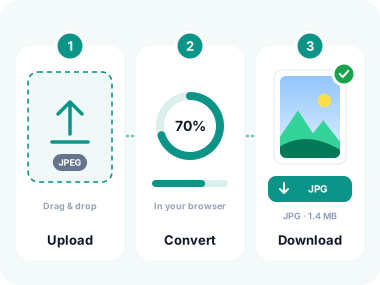
- Upload Your JPEG Images
Click the upload area or drag and drop your JPEG files. You can also paste an image from clipboard or import via URL. Supports HEIC, WebP, PNG, and more. Maximum 10 MB per file. - Convert to JPG
Click "Convert to JPG". The tool instantly renames the extension from .jpeg to .jpg with no re-encoding of lossless formats, preserving every detail of your original image. - Download Your Files
Download each JPG individually or use "Download All" to save a ZIP file containing all converted images.
Key Features of Our JPEG to JPG Converter
Instant Conversion
Convert JPEG to JPG in milliseconds directly in your browser. No waiting for server uploads or processing delays.

Zero Quality Loss
Output JPGs are visually identical to the source JPEG. Same compression, same resolution, just a different extension.
Batch Conversion
Upload and convert multiple JPEG files at once. Download individually or as a single ZIP archive.

100% Private
All processing happens locally in your browser. Files never leave your device and are never stored or shared.
Crop and Edit
Crop, rotate, or flip images before converting using our built-in image editor.

Multiple Input Sources
Upload from device, paste from clipboard, or import via URL. Supports HEIC, WebP, PNG, SVG and more.
Why Users Convert JPEG to JPG
A simple extension difference can cause real-world upload failures. Here is when conversion helps.
Job Applications
Many applicant tracking systems only accept .jpg profile photos. Convert your .jpeg headshot before uploading to any job portal.
Website Uploads
Some CMS platforms and e-commerce sites restrict image uploads to .jpg only. Convert your images before publishing.
Email Clients
Older email clients sometimes fail to preview .jpeg attachments. Use .jpg for guaranteed inline image previews.
Print Services
Some print shops specify .jpg for order submissions. Convert your .jpeg photos to avoid rejected orders.
Social Media
Standardise your image library to .jpg before bulk uploading to social platforms for consistent file management.
File Standardisation
Keep your image library consistent by converting all .jpeg files to .jpg for simpler file management and searches.
40K+
Images converted monthly
<1s
Average conversion time
4.9/5
Average user rating
Frequently Asked Questions
Is there any difference between JPEG and JPG?
No. JPEG and JPG are the same format. The difference is only in the extension length. Early Windows systems limited file extensions to three characters, so .jpeg became .jpg. Both use identical compression and produce identical image quality and file size.
Why would I need to convert JPEG to JPG?
Some upload forms, government portals, job application systems, or software tools perform strict file extension validation and only accept .jpg files, rejecting .jpeg. Converting ensures your files pass these checks without modifying the image itself.
Will the converted JPG look different from the original JPEG?
No. The converted JPG is visually identical to the original JPEG. Both use the same compression algorithm. Our converter already-JPEG files are renamed without re-encoding. Other formats are converted in the browser.
Is this JPEG to JPG converter safe to use?
Yes. Conversion happens in your browser. Your files are deleted when you close the tab.
Can I convert multiple JPEG files at once?
Yes! Upload as many JPEG files as you need and convert them all at once. Download them individually or as a convenient ZIP archive.
Security You Can Trust
Conversion happens in your browser.
Your files are deleted when you close the tab.
SSL/TLS Encryption
All transfers use 256-bit encryption, the same standard protecting financial transactions worldwide.
Zero Retention
Your files are deleted when you close the tab.
Privacy Compliant
Independently audited for GDPR and CCPA compliance. Your data rights are fully protected.
What Our Users Say
Trusted by thousands of users who needed a quick extension fix.
"A government form I needed to submit required .jpg but my camera saved .jpeg files. This tool converted all 8 files in seconds. No hassle at all."
Priya O.
Freelancer
"I manage product images for an e-commerce store. The upload system only accepted .jpg. This batch converter saved me from renaming 200 files manually!"
Chris W.
E-commerce Manager
"Clean, fast, and private. Exactly what I needed. I was sceptical that it was free but it genuinely does everything without limits or watermarks."
Fatima H.
Student
Explore More Tools
Everything you need to convert and edit your images.
Convert to JPG
Convert from JPG
Other Tools
Convert JPEG to JPG Online
Upload your JPEG files and get universally accepted JPG images instantly. No signup, no software, no cost.
- ✓ 100% free
- ✓ No signup
- ✓ Files stay private