PNG to ICO Converter
Convert your PNG images to ICO format online for free. Generate multi-size icons with transparency. Instant download, no signup, no watermarks.
How to Convert PNG to ICO in 3 Simple Steps
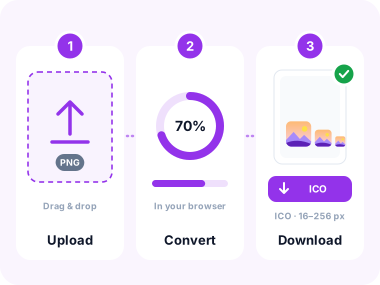
- Upload Your PNG Image
Click the upload area or drag and drop your PNG file. Multiple files are supported for batch conversion. - Convert to ICO
Click "Convert to ICO". Processing happens instantly in your browser. No server upload required. Generates 16×16, 32×32, and 48×48 sizes in one ICO file. - Download Your ICO
Download your ICO file instantly. Use it as a favicon, Windows app icon, or desktop shortcut icon.
Key Features of Our PNG to ICO Converter

Lightning-Fast Conversion
Convert PNG to ICO in seconds using client-side processing. No server uploads, no waiting.

Multi-Size ICO Output
Generates a single ICO file containing 16×16, 32×32, and 48×48 size variants for maximum compatibility.

Batch Conversion
Convert multiple PNG images to ICO at once. Download individually or as a ZIP archive with no limits.

Complete Privacy
Conversion happens in your browser. Your files are deleted when you close the tab.

Transparency Preserved
PNG transparency (alpha channel) is fully preserved in the output ICO files perfect for logos on any background.

Multiple Input Sources
Upload from device, paste from clipboard, or import via URL. Works with any PNG image.
Common Use Cases
Website Favicons
Create the favicon.ico file for your website from your logo or brand mark. ICO is the universally supported favicon format for all browsers.
Windows App Icons
Package your application icon as an ICO file for Windows executables, installers, and desktop shortcuts.
Desktop Shortcuts
Assign custom ICO icons to desktop shortcuts and folders in Windows for a personalised look.
Software Development
Developers can quickly convert design exports to ICO for use in .NET, WPF, WinForms, or Electron applications.
Browser Extensions
Chrome and Firefox extensions require an ICO or PNG icon. Convert your brand PNG to ICO for full compatibility.
Branding & Identity
Produce professional multi-size ICO files from your brand assets to ensure crisp display at 16px, 32px, and 48px.
Frequently Asked Questions
Why convert PNG to ICO?
ICO is the standard format for Windows icons and website favicons. Browsers and operating systems require ICO format for favicon.ico files. Converting your PNG logo or image ensures it displays correctly as a browser tab icon, desktop shortcut, or Windows application icon.
What sizes does the ICO file contain?
Our converter generates a multi-resolution ICO file containing 16×16, 32×32, and 48×48 pixel images all in one file. This ensures your icon looks sharp at every size Windows or browsers may request, from tiny taskbar icons to larger desktop displays.
Will transparency be preserved in the ICO file?
Yes. The ICO format supports 32-bit colour with a full alpha channel. Any transparency in your PNG, including semi-transparent areas, is fully preserved in the converted ICO file, so your icon blends correctly on any background colour.
Is this PNG to ICO converter safe to use?
Conversion happens in your browser. Your files are deleted when you close the tab.
Can I convert multiple PNG files to ICO at once?
Yes! Upload multiple PNG files and convert them all to ICO at once. Download them individually or as a single ZIP archive with no limits on the number of files per session.
Do you add watermarks to converted ICO files?
Never. Your converted ICO files are completely clean with no logos, watermarks, or branding of any kind added to your icons.
Security You Can Trust
Conversion happens in your browser. Your files are deleted when you close the tab.
Unlike other converters that store your images for analysis or advertising, we take a strict zero-retention approach. Your files are processed in memory and permanently erased the moment you're done.
SSL/TLS Encryption
All transfers use 256-bit encryption, the same standard protecting financial transactions worldwide.
Zero Retention
Your files are deleted when you close the tab.
Privacy Compliant
Independently audited for GDPR and CCPA compliance. Your data rights are fully protected.
What Our Users Say
Trusted by developers, designers, and web creators worldwide.
"Generated a perfect favicon.ico in seconds. The multi-size output saved me so much time, and it worked immediately in all browsers."
Tom H.
Web Developer
"Converted my app logo to ICO without installing any software. Transparency was perfectly preserved. Excellent tool!"
Lisa M.
UI Designer
"Fast, clean, totally private. Used it for bulk converting brand icons to ICO for a Windows app. Nothing is ever uploaded. Best tool out there."
Ravi K.
Software Engineer
Explore More Tools
Convert, compress, and transform any image format.
Convert from PNG

Convert from JPG

Other Tools



Convert PNG to ICO Online for Free
Upload your PNG image and get a multi-size ICO file instantly. Fast, secure, and completely free.
- ✓ 100% free
- ✓ No signup
- ✓ Files stay private