SVG to JPG Converter
Turn SVG logos and icons into JPG files that open anywhere. Free, private, and no software to install.
How to Convert SVG to JPG in 3 Simple Steps
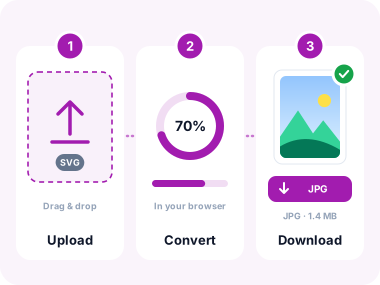
- Upload Your SVG Files
Click the upload area or drag and drop one or more SVG drawings. You can also fetch a file from a URL. - Convert to JPG
Click Convert. The tool paints each SVG onto a canvas in your browser and saves a high-quality JPG. Transparent areas become white. - Download Your JPGs
Download each file, or use Download All to get a ZIP when you converted more than one.
Key Features of Our SVG to JPG Converter
Rasterize logos and icons in the tab you already have open. No upload queue and no account.

Instant Conversion
Each SVG is drawn on a canvas in your browser and saved as JPG in a few seconds.

High Quality Output
Output uses high-quality JPEG, so edges from logos and icons stay clean at the source size.

Batch Conversion
Drop several SVG files at once, then download them one by one or as a ZIP.

100% Private
Files stay in this tab. Nothing is stored on our servers after you close the page.
No Watermarks
Your JPGs are clean. We do not stamp logos or ads on the result.

Opens Anywhere
JPG is accepted by email, social apps, Office files, and almost every image upload form.
When Do You Need to Convert SVG to JPG?
SVG is ideal for design work. JPG is what most people and tools can open.
Email and Chat
Many mail apps skip SVG attachments. Send a JPG so the logo or icon shows in the message.
Social Media
Instagram, Facebook, and X expect JPG or PNG. Convert the SVG before you post.
Slides and Documents
Word, PowerPoint, and Google Docs handle JPG reliably. Convert first, then drop the file into the deck.
Print Shops
Photo labs and many print forms ask for JPG. Rasterize the artwork at the size you need, then send it.
Website Uploads
Some CMS and marketplace forms block SVG. A JPG goes through without extra plugins.
Client Handoff
Share a preview JPG with people who do not use a vector editor, and keep the SVG as the master file.
Frequently Asked Questions
What is an SVG file?
SVG (Scalable Vector Graphics) is an XML-based format for drawings, logos, and icons. It stays sharp at any size. Many apps, email clients, and print shops still need a JPG instead.
Why convert SVG to JPG?
JPG opens everywhere: email, social posts, Word, PowerPoint, and most CMS uploads. Converting an SVG to JPG gives you a photo-style file that those tools accept.
What happens to transparent backgrounds?
JPG cannot store transparency. Clear areas in your SVG become a solid white background in the downloaded JPG.
Is this SVG to JPG converter safe to use?
Conversion happens in your browser. Your files are deleted when you close the tab.
Can I convert multiple SVG files at once?
Yes. Upload several SVG files, click Convert, then download each JPG or grab them all as a ZIP.
Will the JPG look as sharp as the SVG?
The tool paints your SVG onto a canvas at the drawing size, then saves a high-quality JPG. The result matches the preview. Linked images inside the SVG may not load.
Do you add watermarks to the converted JPGs?
Never. We do not add watermarks, logos, or branding to your files.
Do I need to create an account?
No. Upload your SVG, convert, and download. No signup and no usage limit.
Related Image Conversion Tools
More ways to move between vector files and everyday photo formats.
Convert from SVG
Convert to JPG
Other Useful Tools

Convert SVG to JPG Instantly
Upload your SVG files and download JPGs that open in email, slides, and social apps. No software, no signup, no cost.
- ✓ 100% free
- ✓ No signup
- ✓ Files stay private