JPG To Excel Converter Online
Convert JPG, PNG, and scanned images to editable Excel spreadsheets free online. Extract tables, invoices, and data from images with our OCR-powered converter.
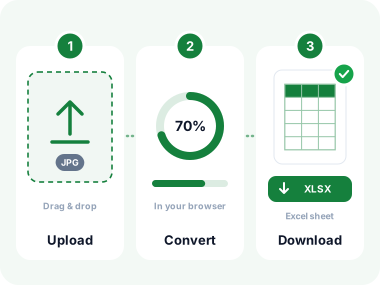
How to Convert JPG to Excel in 3 Simple Steps
- Upload Your JPG Image
Click "Choose Files" or drag and drop your JPG image of a table, invoice, receipt, or any document containing data. Supports JPG, PNG, HEIC, BMP, TIFF, and WebP. Maximum file size: 10 MB. - OCR Extracts Your Data
The image is sent to our server. OCR reads rows and columns and returns spreadsheet data. Accuracy depends on image quality. Your files are processed securely and deleted after conversion. - Download Your Excel File
Click Download to save the converted .xlsx file instantly. Open it in Microsoft Excel, Google Sheets, or any compatible spreadsheet application and start editing immediately.
Key Features of Our JPG to Excel Converter
Turn scanned tables, invoices, and data images into fully editable spreadsheets instantly.

High-Accuracy OCR Engine
Powered by advanced OCR and AI algorithms, the tool extracts text and table structures from your JPG with near-perfect accuracy, even from low-quality scans.

Automatic Table Detection
The converter intelligently identifies rows, columns, headers, and cell boundaries in your image and maps them directly into the correct Excel cell structure.

Batch Conversion
Upload multiple JPG images at once and convert them all to Excel in a single session. Ideal for processing stacks of invoices, reports, or multi-page scanned documents.

50+ Language Support
Extract text in English, Spanish, French, German, Arabic, Chinese, Japanese, Hindi, and 40+ more languages. Perfect for international invoices and multilingual documents.

Private and Secure
Your files are processed securely and deleted after conversion.

No Watermarks, No Limits
Your converted Excel files are completely clean with no watermarks, branding, or usage restrictions. Download and use them in any application right away.
Common Uses for JPG to Excel Conversion
Whether you're processing invoices, digitizing reports, or automating data entry, turning image-based data into editable spreadsheets saves hours of manual work.
Invoice and Receipt Processing
Convert scanned or photographed invoices and receipts into Excel to extract line items, amounts, dates, and vendor names without manual data entry.
Financial Report Digitization
Turn printed or scanned financial statements, balance sheets, and income reports into editable Excel spreadsheets for analysis and modelling.
Data Table Extraction
Extract tables from research papers, printed reports, textbooks, and academic documents into Excel format for further analysis or data visualization.
Inventory and Product Lists
Convert product catalog images, price lists, and inventory sheets from photos or scans into structured Excel files for stock management systems.
Survey and Form Results
Digitize paper survey results, feedback forms, and filled registration forms into Excel, making it easy to sort, filter, and analyze responses.
Legacy Data Migration
Convert old printed reports, paper archives, and historical records into modern Excel files, making decades of data accessible and searchable.
How OCR Powers the JPG to Excel Conversion
Optical Character Recognition (OCR) is the technology that reads text from images. For JPG to Excel, the OCR engine goes further: it not only identifies individual characters but also detects table structures, row boundaries, and column alignment to rebuild the spreadsheet intelligently.
Image Preprocessing
The image is optimized (contrast enhanced, noise removed, skew corrected) so text and table lines are as sharp as possible before recognition begins.
Table Structure Detection
AI algorithms identify horizontal and vertical lines, cell borders, and column groupings. Each text region is mapped to a specific row/column coordinate in the output spreadsheet.
Excel File Generation
The recognized text is placed into the correct cells of a .xlsx file. Column widths are auto-fitted, text alignment is preserved, and the file is ready for immediate download and editing.
Frequently Asked Questions
What image formats does the tool support?
The converter accepts JPG, JPEG, PNG, BMP, TIFF, GIF, WebP, and HEIC (iPhone photos). Upload from any device (desktop, laptop, tablet, or phone) without worrying about format compatibility.
How accurate is the JPG to Excel conversion?
For clear, high-resolution images of printed tables, accuracy is very high. Results depend on image quality: well-lit scans at 300 DPI give the best output. Blurry, low-contrast, or handwritten tables will have lower accuracy and may require manual corrections in Excel afterward.
Can I convert multiple pages or images at once?
Yes. Upload multiple JPG images at once and the tool processes each one. Each image is converted to its own spreadsheet data set. This is ideal for multi-page invoice stacks, multi-page scanned reports, or batch data entry tasks.
Is my data safe and private?
Your files are processed securely and deleted after conversion.
Do I need to sign up or pay?
No registration, sign-up, or payment required. The JPG to Excel converter is completely free to use with no hidden fees, trial periods, or premium tiers. Start converting immediately without providing any personal information or email address.
What Our Users Say
"I process dozens of supplier invoices every week. This tool converts scanned invoice JPGs to Excel in seconds. What used to take 2 hours of typing now takes 5 minutes."
"I use this for converting scanned research data tables into Excel for statistical analysis. The table structure recognition is impressive. Saves me so much manual entry."
"We digitized 10 years of paper sales reports using this tool. Converted hundreds of JPG scans to Excel. Clean output, no watermarks, completely free. Highly recommend."
Privacy and Security
Your files are processed securely and deleted after conversion.
Your files are processed securely and deleted after conversion.
SSL/TLS Encryption
256-bit encryption for all uploads and downloads, matching security standards used by banks and financial institutions.
Instant Auto-Deletion
Files purged from servers immediately after download. There is no retention period. Your images and data vanish instantly.
GDPR and CCPA Certified
Fully compliant with international privacy regulations. Your data rights are legally protected and enforced.
Related Image Conversion Tools
More tools for working with your images and documents.
Convert From JPG

Convert to JPG

Other Tools


Convert JPG to Excel Instantly
Upload any image of a table, invoice, or form and get a clean, editable Excel spreadsheet in seconds. Free, private, and no watermarks.
- ✓ 100% free
- ✓ No signup
- ✓ Files stay private