Konversi JPG ke WebP Online
Ubah gambar JPG Anda ke format WebP modern secara instan dan gratis. Dapatkan ukuran file yang jauh lebih kecil dengan kualitas visual yang identik, ideal untuk situs web yang lebih cepat dan SEO yang lebih baik.
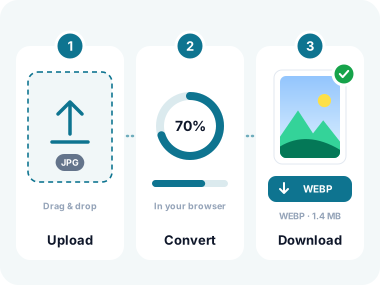
Cara Mengonversi Gambar ke WebP dalam 3 Langkah Mudah
- Unggah Gambar Anda
Klik "Pilih File" atau seret dan lepas gambar Anda ke area unggah. Mendukung JPG, PNG, SVG, HEIC, TIFF, BMP, GIF, AVIF, WebP, ICO, dan format gambar umum lainnya. PSD tidak didekode di halaman ini. Batas ukurannya adalah memori browser. - Pilih Kualitas & Konversi
Pilih tingkat kualitas yang Anda inginkan: Tinggi (kualitas terbaik), Sedang (seimbang), atau Rendah (ukuran file terkecil). Klik "Konversi ke WebP" untuk memproses semua gambar sekaligus. SVG dirasterisasi pada dimensi aslinya untuk hasil yang presisi hingga piksel. - Unduh File WebP Anda
Unduh file WebP hasil konversi satu per satu atau ambil semuanya sekaligus sebagai arsip ZIP. Gambar asli Anda tidak pernah diunggah. Semua konversi terjadi di browser Anda demi privasi dan kecepatan maksimal.
Fitur Utama Konverter Gambar ke WebP Kami
Dukungan Format Universal
Konversi JPG, PNG, SVG, HEIC, TIFF, BMP, GIF, AVIF, ICO, dan lainnya ke WebP. Unggah format gambar apa pun, dan alat kami menangani semuanya dengan lancar dalam satu batch.
Konversi Secepat Kilat
Semua pemrosesan berjalan sepenuhnya di browser Anda menggunakan teknologi Canvas yang canggih. Tidak perlu menunggu unggahan ke server; konversi terjadi secara instan, bahkan untuk gambar dalam jumlah besar.

Kontrol Kualitas yang Dapat Disesuaikan
Pilih pengaturan kualitas Tinggi, Sedang, atau Rendah untuk menyeimbangkan ketajaman visual dan ukuran file. WebP dengan kualitas sedang biasanya memperkecil ukuran file 60-80% dibandingkan JPG aslinya.

Rasterisasi SVG
Konversi file vektor SVG menjadi gambar WebP yang presisi hingga piksel. Alat kami membaca dimensi dan viewBox SVG untuk memastikan rasterisasi tajam pada resolusi yang tepat, tanpa distorsi.
Privasi 100% di Sisi Klien
Gambar Anda tidak pernah meninggalkan perangkat Anda. Tanpa unggahan ke server, tanpa pengumpulan data. Semua konversi terjadi secara lokal di browser Anda, bahkan tetap berfungsi offline setelah halaman dimuat.
Pemrosesan Massal & Unduhan ZIP
Unggah puluhan gambar, konversi semuanya dengan satu klik, dan unduh hasilnya sebagai arsip ZIP. Sempurna bagi pengembang web yang mengoptimalkan seluruh pustaka gambar.
Tanpa Watermark, Sepenuhnya Gratis
Tanpa biaya tersembunyi, tanpa watermark, tanpa pendaftaran, tanpa batasan. Konversi gambar sebanyak yang Anda perlukan, sesering yang Anda mau. 100% gratis selamanya.
Pangkas & Putar Bawaan
Edit gambar Anda sebelum dikonversi dengan alat pangkas, putar, dan balik bawaan. Atur komposisi, perbaiki orientasi, dan dapatkan hasil sempurna tanpa perangkat lunak eksternal.
Mengapa Mengonversi ke WebP?
WebP memberikan kompresi unggul untuk web modern. Lihat manfaatnya di setiap kasus penggunaan
Situs Web Lebih Cepat & SEO Lebih Baik
Gambar WebP 25-34% lebih kecil daripada JPG dan 26% lebih kecil daripada PNG. Pemuatan halaman yang lebih cepat secara langsung meningkatkan peringkat Google, Core Web Vitals, dan pengalaman pengguna Anda.
Halaman Produk E-Commerce
Perkecil ukuran gambar tanpa penurunan kualitas yang terlihat. Gambar produk yang dimuat lebih cepat berarti bounce rate lebih rendah, konversi lebih tinggi, dan biaya bandwidth lebih hemat dalam skala besar.
Blog & Pemasaran Konten
Jaga postingan blog tetap secepat kilat meski berisi banyak gambar. WebP menghasilkan foto yang tajam dengan ukuran file jauh lebih kecil, sehingga pembaca tidak perlu menunggu konten Anda.
Aset Aplikasi Seluler
Gambar yang lebih kecil berarti bundel aplikasi lebih kecil dan unduhan lebih cepat. WebP didukung secara native di Android dan iOS, menjadikannya format ideal untuk aplikasi seluler.
Pemasaran Email
Banyak klien email kini mendukung WebP. Gunakan gambar yang lebih kecil dalam kampanye Anda untuk meningkatkan keterkiriman dan mempercepat waktu muat di kotak masuk di seluruh dunia.
Konversi SVG ke Raster
Butuh versi raster yang presisi hingga piksel dari logo atau ikon vektor Anda? Konversi SVG ke WebP pada dimensi aslinya, ideal untuk platform yang tidak mendukung SVG.
Pertanyaan yang Sering Diajukan (FAQ)
Apa itu WebP dan mengapa saya harus menggunakannya?
WebP adalah format gambar modern yang dikembangkan oleh Google yang menawarkan kompresi lossy dan lossless yang unggul. Gambar WebP 25-34% lebih kecil daripada gambar JPEG sebanding dan 26% lebih kecil daripada gambar PNG, dengan kualitas visual yang tetap identik. Format ini didukung oleh semua browser modern termasuk Chrome, Firefox, Safari, dan Edge.
Format gambar apa saja yang dapat saya konversi ke WebP?
Konverter kami mendukung semua format gambar utama: JPG, JPEG, PNG, SVG, GIF, BMP, TIFF, WebP, HEIC, HEIF, AVIF, ICO, dan lainnya. Anda bahkan bisa mencampur berbagai format dalam satu batch: unggah JPG, SVG, dan PNG bersamaan lalu konversi semuanya ke WebP sekaligus.
Bisakah saya mengonversi file SVG ke WebP?
Ya! Alat kami dilengkapi teknologi rasterisasi SVG khusus. Saat Anda mengunggah SVG, kami membaca dimensi aslinya (dari atribut width/height atau viewBox) dan merendernya dalam resolusi penuh sebelum dikonversi ke WebP. Ini memastikan hasil yang presisi hingga piksel tanpa distorsi. Jika dimensi tidak ditentukan, kami menggunakan ukuran default 1024×1024 piksel.
Apakah konversi memengaruhi kualitas gambar?
Kompresi WebP sangat efisien. Pada kualitas "Tinggi", hasilnya identik secara visual dengan aslinya. Pada "Sedang" (default kami), Anda mendapatkan keseimbangan yang sangat baik, biasanya file 60-80% lebih kecil tanpa penurunan kualitas yang terasa. Bahkan pada kualitas "Rendah", gambar tetap jelas dan layak digunakan untuk sebagian besar aplikasi web.
Apakah gambar saya diunggah ke server?
Tidak. Semua konversi terjadi 100% di browser Anda menggunakan HTML5 Canvas API. Gambar Anda tidak pernah meninggalkan perangkat Anda: tidak pernah diunggah, disimpan, atau dikirim ke server mana pun. Hal ini menjadikan konverter kami salah satu alat gambar online yang paling menjaga privasi.
Berapa banyak gambar yang dapat saya konversi sekaligus?
Tidak ada batas tetap. Anda dapat mengonversi puluhan gambar dalam satu batch. Karena pemrosesan dilakukan secara lokal, performanya bergantung pada perangkat Anda. Sebagian besar komputer modern dapat menangani 50+ gambar dengan lancar. Anda dapat mengunduh semua file hasil konversi sebagai satu arsip ZIP.
Apakah WebP didukung oleh semua browser?
Ya, WebP didukung oleh semua browser modern termasuk Chrome, Firefox, Safari (14.0+), Edge, dan Opera. Format ini menjangkau lebih dari 97% pengguna di seluruh dunia. Untuk sebagian kecil pengguna browser lama, Anda dapat menggunakan elemen HTML <picture> untuk menyajikan JPG atau PNG cadangan bersama gambar WebP Anda.
Apakah saya perlu menginstal sesuatu?
Tidak perlu instalasi. Konverter WebP kami bekerja sepenuhnya di browser web Anda. Cukup buka halaman, unggah gambar, dan konversi. Tanpa plugin, tanpa unduhan, tanpa perlu mendaftar. Berfungsi di Windows, Mac, Linux, Android, iOS, atau perangkat apa pun dengan browser modern.
Apa Kata Pengguna Kami
Dipercaya oleh pengembang web, desainer, dan pemasar di seluruh dunia
"Saya mengelola situs e-commerce besar dengan ribuan gambar produk. Beralih dari JPG ke WebP memangkas waktu muat halaman kami hingga 40%. Konverter ini membuat migrasinya sangat mudah. Saya mengonversi 200+ gambar secara massal dalam hitungan menit."
"Fitur SVG ke WebP benar-benar mengubah segalanya. Saya mendesain ikon di Illustrator, mengekspornya sebagai SVG, lalu mengonversinya ke WebP untuk platform yang tidak mendukung vektor. Kualitas rasterisasinya sempurna."
"Saya suka karena tidak ada yang diunggah ke server. Sebagai orang yang rutin bekerja dengan foto klien, privasi tidak bisa ditawar. Alat ini mengonversi semuanya secara lokal, dan saya sudah memeriksa tab network untuk memastikannya. Sangat direkomendasikan."
Konversi Privat & Aman
Gambar Anda tetap berada di perangkat Anda. Konverter WebP kami menggunakan arsitektur tanpa unggahan: setiap konversi berjalan sepenuhnya di dalam sandbox browser Anda.
Tidak seperti kebanyakan konverter online yang mengunggah file Anda ke server jarak jauh, kami menggunakan HTML5 Canvas API untuk memproses gambar secara lokal. Foto Anda tidak pernah meninggalkan perangkat Anda, bahkan untuk sementara.
Keamanan Sandbox Browser
Konversi berjalan di dalam lingkungan sandbox browser Anda yang aman. Tanpa akses ke sistem file, tanpa koneksi eksternal.
Patuh GDPR & CCPA
Karena kami tidak pernah mengakses data Anda, kami secara inheren mematuhi semua regulasi privasi utama di seluruh dunia.
Teknologi WebP dari Google
Kami menggunakan encoder WebP bawaan browser, teknologi yang sama yang dikembangkan Google. Andal, teruji, dan dioptimalkan untuk performa.
Alat Gambar Terkait
Lebih banyak alat untuk mengonversi, mengoptimalkan, dan mengelola gambar Anda.
Konversi dari JPG
Konversi ke JPG
Utilitas Gambar

Konversi JPG ke WebP Online - Bahasa Indonesia
Tersedia dalam Bahasa Lain
Konversi Gambar Anda ke WebP: Gratis & Instan
Unggah JPG, PNG, SVG, atau format gambar apa pun dan dapatkan file WebP yang teroptimasi dalam hitungan detik, tanpa daftar, tanpa unggahan, tanpa batasan.
- ✓ 100% free
- ✓ No signup
- ✓ Files stay private